Connection Google Cloud
Purpose
Provides OAuth-based authentication for Google Cloud services. This connection is used by Google Cloud Storage (GCS) Sink and GCS Source to authenticate against Google Cloud Storage using the OAuth 2.0 protocol.
Prerequisites
- A Google Cloud project with the Google Cloud Storage API enabled.
- An OAuth Client resource asset configured in layline.io (or use the default layline.io shared client). See Resources below.
Configuration
Name & Description
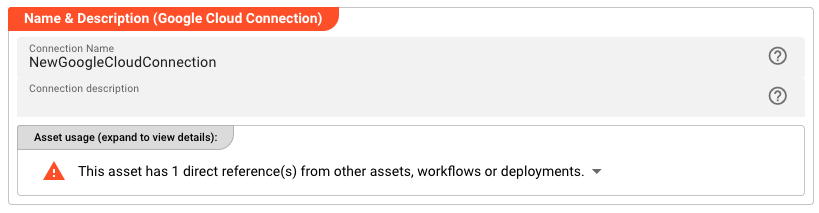
Name — Unique name for this asset within the project. Spaces are not allowed.
Description — Optional description of what this connection is used for.
The Asset Usage box shows how many times this Asset is used and which parts are referencing it.
Required Roles

In case you are deploying to a Cluster with Reactive Engine Nodes that have specific Roles configured, you can restrict use of this Asset to Nodes with matching roles. Leave empty to match all Nodes.
Resources

Link an OAuth Client resource to this connection. Only assets of type oAuthClient are available in the dropdown.
If no OAuth Client resource exists in the project, you must create one first. The OAuth Client resource defines the client credentials (client ID, scopes) that layline.io will use when requesting an access token from Google's OAuth server.
Google Cloud Settings
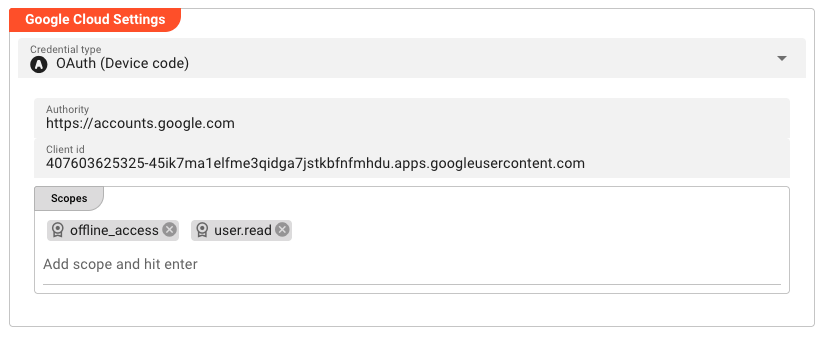
Credential Type — The OAuth 2.0 authentication flow to use.
| Option | Behavior |
|---|---|
| OAuth Client Credentials | Service-account style authentication. Exchange a client ID and secret for an access token. Suitable for server-to-server communication. |
| OAuth Device Code | User-identity authentication via the device code flow. The user approves access on a separate device. Suitable for CLI tools and scenarios where a browser is available. |
Authority — The OAuth 2.0 authority URL. This is the endpoint that issues access tokens. Defaults to https://accounts.google.com. In most cases, this default does not need to be changed.
Client ID — The OAuth client ID issued by Google. Defaults to layline.io's shared client ID:
407603625325-45ik7ma1elfme3qidga7jstkbfnfmhdu.apps.googleusercontent.com
To use your own OAuth client (recommended for production), replace this with your client's client ID. You can also use a placeholder referencing an Environment Resource:
${GOOGLE_CLIENT_ID}
Scopes — Add the OAuth scopes required for your use case. Each scope is entered as a chip — type the scope value and press Enter** to add it.
Default scopes:
offline_access— allows refreshing access tokens without re-prompting the useruser.read— grants read access to user profile information
Add any additional scopes required by your Google Cloud project (for example, https://www.googleapis.com/auth/devstorage.read_write for GCS read/write access).
Behavior
The connection configuration is validated when you save the asset. The actual reachability of Google Cloud services is confirmed at workflow runtime when the Reactive Engine attempts to use this connection.
All Google Cloud Settings fields can be overridden in child assets or inherited from a parent asset in a hierarchy.
See Also
- GCS Sink — Write objects to Google Cloud Storage
- GCS Source — Read objects from Google Cloud Storage
Please note, that the creation of the online documentation is Work-In-Progress. It is constantly being updated. should you have questions or suggestions, please don't hesitate to contact us at support [at] layline.io .