Extension AWS
Deploys an AWS macro resolver that provides
${aws:...}macros for accessing AWS Systems Manager Parameter Store and AWS Secrets Manager values at runtime.
Purpose
The AWS Extension deploys a macro resolver into your engine configuration. Once
deployed, you can use ${aws:<name>} macros anywhere in your project where
macros are supported — Environment assets, connection strings, configuration
values, etc. The resolver connects to AWS and fetches values from either
AWS Systems Manager (SSM) Parameter Store or AWS Secrets Manager.
Deployment model: Add the AWS Extension to an Engine Configuration under "Other Resources". Only one AWS Extension should be deployed per engine (behavior with multiple extensions is undefined).
Prerequisites
- AWS credentials configured in the extension (IAM role, access keys, or default credential chain)
- Parameters/secrets must exist in AWS SSM Parameter Store or Secrets Manager before they can be referenced
Configuration
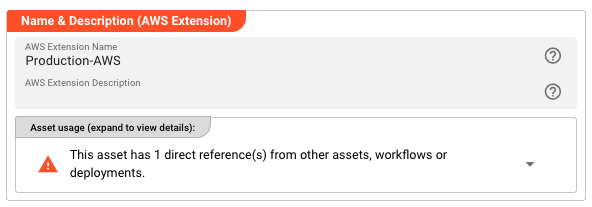
Name & Description
Name — A unique identifier for this AWS Extension within the project.
Description — Optional human-readable explanation of this extension's purpose.
AWS Credentials
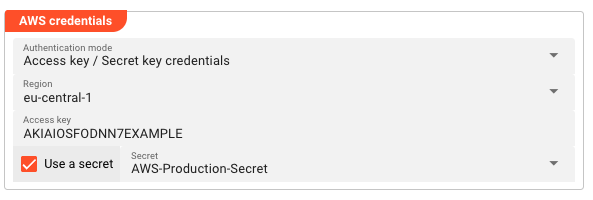
Authentication mode — How layline.io authenticates with AWS:
| Mode | Behavior |
|---|---|
| No credentials required | No authentication. Use only for public resources or local testing. |
| Use the default credential provider chain | Uses AWS SDK default chain (environment variables, ~/.aws/credentials, IAM role, etc.). |
| Access key / Secret key credentials | Explicit IAM credentials with optional Secrets Manager integration. |
Region — The AWS region for SSM/Secrets Manager API calls (e.g., eu-central-1, us-east-1).
Access key — The IAM access key ID (shown when using Access key / Secret key mode).
Use a secret — When enabled, the secret key is retrieved from a layline.io Secret asset instead of being stored directly.
Secret — Reference to a layline.io Secret asset containing the AWS secret access key (shown when "Use a secret" is enabled).
Usage
Once deployed as an Engine Configuration "Other Resource", reference AWS values using macros throughout your project:
# In an Environment asset
databasePassword: ${aws:prod/db/password}
apiKey: ${aws:arn:aws:secretsmanager:eu-central-1:123456789:secret:api-key}
jiraToken: ${aws:${lay:awsParamStoreArn}/jiraPassword}
Macro syntax:
| Pattern | Resolves To |
|---|---|
${aws:<parameter-name>} | SSM Parameter Store parameter by name |
${aws:<secret-name>} | Secrets Manager secret by name |
${aws:<param-arn>} | SSM parameter by full ARN |
${aws:<secret-arn>} | Secret by full ARN |
Using Parameter Store ARN Prefix
Configure the Parameter Store ARN field to set a base ARN prefix. Then reference parameters using the ${lay:awsParamStoreArn} macro:
# If Parameter Store ARN = arn:aws:ssm:eu-central-1:123:parameter/config/layline/prod
# Then ${aws:${lay:awsParamStoreArn}/dbPassword} resolves to the value at:
# arn:aws:ssm:eu-central-1:123:parameter/config/layline/prod/dbPassword
Behavior
- Macros are resolved at runtime when the value is accessed
- The AWS Extension must be deployed in the active Engine Configuration for
${aws:...}macros to resolve - Parameter Store values are retrieved using the GetParameter API
- Secrets Manager values are retrieved using the GetSecretValue API
- Encrypted SSM parameters are automatically decrypted (requires appropriate IAM permissions)
Example
Scenario: Multiple workflows need to access a shared database password stored in AWS Secrets Manager.
Setup:
- Create an AWS Extension named
Production-AWSwith access key credentials foreu-central-1 - Add the extension to your Engine Configuration under "Other Resources"
- In your Environment asset, reference the secret:
db-password: ${aws:prod/database/password}
Result: When the workflow runs, the ${lay:db-password} macro resolves to thre value of the database password stored in AWS Secrets Manager. You can also use the macro direct as ${aws:prod/database/password}. When the secret rotates, workflows automatically pick up the new value on next execution — no deployment needed.
See Also
- Secret — Secure storage for sensitive values within layline.io
- Environment — Project-wide configuration values
- Engine Configuration — Runtime configuration including "Other Resources"