Extension Prometheus
Purpose
Exports layline.io processing metrics to Prometheus. The Prometheus Extension maps internal metric names (defined by your workflow configuration) to the names under which Prometheus will expose them.
Metrics are named using dot notation — all layline.io metric names start with Counter. (e.g., Counter.Source.MySource.Files). Prometheus converts these dots to underscores in the exported metric name. For example:
Counter.Source.MySource.Files → io_layline_counter_source_mysource_files
The Prometheus Extension is assigned to a Project or an Engine Configuration to enable metric export.
For a full list of available default metrics and how to configure Prometheus + Grafana, see Gathering Statistics through Metrics.
This Asset can be used by:
| Asset type | Link |
|---|---|
| Projects | Project |
| Deployment | Engine Configuration |
Configuration
Name & Description
-
Name: Name of the Asset. Spaces are not allowed in the name. -
Description: Enter a description.
Inheritance chain of this Asset — If this Asset extends another, the inheritance chain is shown here. Click to navigate to any parent Asset in the chain.
Asset Usage: If the Asset is used by other Assets, the Asset Usage box shows how many times this Asset is used and which parts are referencing it. Otherwise it is not shown. Click to expand and then click to follow, if any.
Required Roles

In case you are deploying to a Cluster which is running (a) Reactive Engine Nodes which have (b) specific Roles
configured, then you can restrict use of this Asset to those Nodes with matching
roles.
If you want this restriction, then enter the names of the Required Roles here. Otherwise, leave empty to match all
Nodes (no restriction).
Prometheus Mappings
A table of mapping rules. Each row defines how one internal metric is named and labelled when exported to Prometheus.
| Column | Description |
|---|---|
| Match | A regex pattern that matches the internal metric name to export (e.g., Counter.Source.*.Files) |
| Name | The name under which Prometheus will expose this metric (e.g., io_layline_counter_source_files) |
| Labels | One or more key–value label pairs that add dimensions to the exported metric, making it filterable in Prometheus queries |
| Operations | Action buttons per row: add a label, delete the mapping, reorder with up/down arrows |
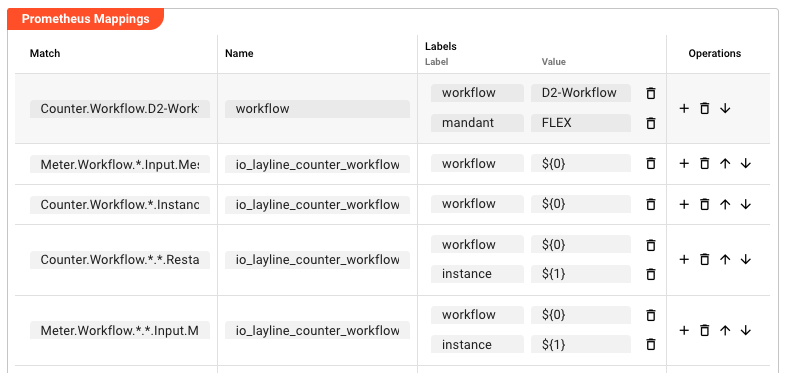
How Match works: The regex is evaluated against the full internal metric name. Use * as a wildcard to match any segment. The first matching row wins — ordering matters when multiple patterns could match the same metric.
How Labels work: Labels are key–value pairs (Label Name → Label Value). The Label Name is a static string. The Label Value can be:
- A static string — the same label value is applied to every matching metric (e.g.,
FLEXin the screenshot above) - A wildcard placeholder —
${N}references the wildcard segment at positionNin the Match pattern, where${0}is the first*,${1}is the second*, and so on. The placeholder is resolved at export time using the actual metric name that matched.
Example of placeholder resolution:
Given a Match of Counter.Workflow.(*).(*).* with labels workflow=${0} and instance=${1}:
- For metric
Counter.Workflow.OrderProcessing.Inst1.Filesthe exported label values would be:workflow=OrderProcessing,instance=Inst1 - For metric
Counter.Workflow.Billing.Inst2.Filesthe exported label values would be:workflow=Billing,instance=Inst2
The ${0} placeholder captures the first wildcard segment (between the start and the first *), and ${1} captures the second.
Press Add Mapping to add a new row. Press + in the Operations column of a row to add label pairs to that mapping.
Example
Export the file count metric for a source named OrderFileSource, adding a label so the metric can be filtered by source name in Prometheus.
Match (regex):
Counter.Workflow.(*).(*).Input.Messages
Name:
io_layline_counter_workflow_input_messages
Labels:
| Label Name | Label Value | Meaning |
|---|---|---|
workflow | ${0} | First wildcard segment → workflow name |
instance | ${1} | Second wildcard segment → instance name |
Placeholder resolution: For the metric Counter.Workflow.OrderProcessing.Inst1.Input.Messages, the placeholders resolve to workflow=OrderProcessing and instance=Inst1. The exported Prometheus metric becomes:
io_layline_counter_workflow_input_messages{workflow="OrderProcessing",instance="Inst1"}
In contrast, a static label value (e.g., mandant=FLEX) applies the same value to every metric that matches — useful for tagging all exports from this Prometheus Extension with an environment or owner identifier.
What this enables in Prometheus:
- Query all workflow input messages:
io_layline_counter_workflow_input_messages - Filter by workflow name:
io_layline_counter_workflow_input_messages{workflow="OrderProcessing"} - Plot over time in Grafana
Export URL: Metrics are available at http://<engine-host>:5842/engine/prometheus once the Extension is assigned to a Project or Engine Configuration.