Source Message
Purpose
Define a Message Source. A Message Source defines one or more topics that can be used to exchange messages between Workflows, Processors, and other Assets within a layline.io project. It acts as an internal message broker — topics are shared across the Reactive Engine cluster and can be consumed by multiple processors.
Architecture
The Message Source is the consumer side of layline.io's internal messaging system. The corresponding producer side is the Message Service, which is used to publish messages to topics defined in a Message Source.
Together, they form a publish/subscribe system:
Messages published via a Message Service are routed to the configured topic. Any Input Processor (such as Stream Input or Frame Input) that references this Message Source can subscribe to and consume those messages.
Use Cases
A Message Source is useful in scenarios such as:
- Workflow-to-Workflow communication: One Workflow publishes messages to a topic via a Message Service; another Workflow subscribes to that topic via a Message Source and processes the messages further.
- Fan-out processing: A single topic can be consumed by multiple processors in parallel, each processing different partitions of the data.
- Cross-cluster messaging: Topics scoped to
Clusterare available across all Reactive Engine nodes; topics scoped toNodeare local to each node. - Decoupling: Producers and consumers are decoupled — the producer does not need to know which processors consume its messages.
This Asset can be used by:
| Asset type | Link |
|---|---|
| Input Processors | Stream Input |
| Frame Input |
Related Asset
| Asset | Description |
|---|---|
| Message Service | Publishes messages to topics defined in this Message Source |
Configuration
Name & Description
-
Source Name: Name of the Asset. Spaces are not allowed in the name. -
Source Description: Enter a description.
The Asset Usage box shows how many times this Asset is used and which parts are referencing it.
Click to expand and then click to follow, if any.
Required Roles
In case you are deploying to a Cluster which is running (a) Reactive Engine Nodes which have (b) specific Roles
configured, then you can restrict use of this Asset to those Nodes with matching roles.
If you want this restriction, then enter the names of the Required Roles here. Otherwise, leave empty to match all
Nodes (no restriction).
Throttling & Failure Handling
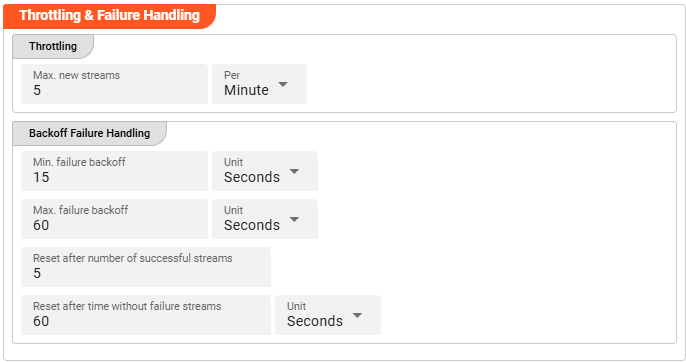
Throttling
These parameters control the maximum number of new stream creations per given time period.
Max. new streams — Maximum number of streams this source is allowed to open or process within the given time period.
Per — Time interval unit for the Max. new streams value.
Configuration values for this parameter depend on the use case scenario. Assuming your data arrives in low frequency cycles, these values are negligible. In scenarios with many objects arriving in short time frames, it is recommended to review and adapt the default values accordingly.
Backoff Failure Handling
These parameters define backoff timing intervals in case of failures. The system will progressively throttle down the processing cycle based on the configured minimum and maximum failure backoff boundaries.
Min. failure backoff — The minimum backoff time before retrying after a failure.
Unit — Time unit for the minimum backoff value.
Max. failure backoff — The maximum backoff time before retrying after a failure.
Unit — Time unit for the maximum backoff value.
Based on these values, the next processing attempt is delayed: starting at the minimum failure backoff interval, the wait time increases step by step up to the maximum failure backoff.
Reset after number of successful streams — Resets the failure backoff throttling after this many successful stream processing attempts.
Reset after time without failure streams — Resets the failure backoff throttling after this amount of time passes without any failures.
Unit — Time unit for the time-based backoff reset.
Whatever comes first — the stream count or the time threshold — resets the failure throttling after the system returns to successful stream processing.
Stream Settings
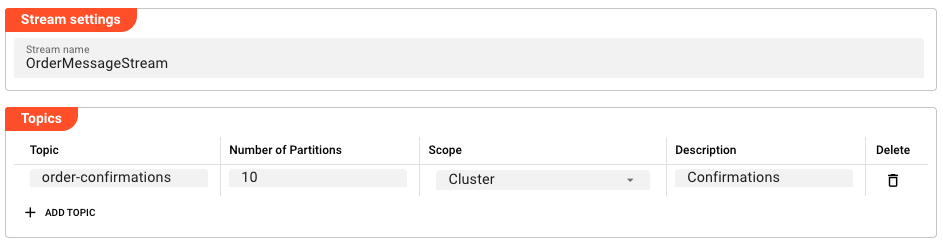
Stream name: The name of the internal stream used to publish messages from this source. All topics in this source belong to this stream.
Topics
Topics define the individual message channels within the stream. Each topic can be independently scoped.
Click Add Topic to add a new topic entry.
| Column | Description |
|---|---|
| Topic | The name of the topic |
| Number of Partitions | Number of partitions for this topic (affects parallelism) |
| Scope | Node — topic is local to each Engine node; Cluster — topic is shared across the entire cluster |
| Description | Optional description of the topic |
How It Works
In a layline.io Workflow, a Message Source is assigned to an Input Processor (such as Stream Input or Frame Input). The Input Processor connects to the source and receives messages from the configured topics. The messages are then passed through the Workflow for processing.
Topics with Cluster scope are visible and accessible from any Reactive Engine node in the cluster. Topics with Node scope are only visible to the local node, which can be useful for node-local caching or coordination.
The number of partitions determines how many parallel instances of a processor can consume from the same topic — each partition can be processed by a different thread or node simultaneously.
Example: Publishing to a Topic
To publish messages to a topic, use a Message Service from a JavaScript or Python processor. The Message Service references this Message Source and exposes functions that publish to its topics.
Example (JavaScript):
/**
 * Publish an order confirmation message to the orders topic
 * @param orderData The order data to publish
 */
function publishOrderConfirmation(orderData) {
    services.OrderMessageService.PublishOrderConfirmation({
        Topic: "order-confirmations",
        PartitionKey: orderData.orderId,
        Request: orderData
    });
}
For a complete example, see Message Service.
For information on using JavaScript Processors, see JavaScript Processor.
Please note, that the creation of the online documentation is Work-In-Progress. It is constantly being updated. should you have questions or suggestions, please don't hesitate to contact us at support [at] layline.io .