Tag Settings
Configure deployment tags to organize and filter engines and deployments within a layline.io cluster.
Purpose
In a layline.io cluster, you may have multiple Reactive Engines running across different environments, roles, or physical nodes. The Tag Settings Asset allows you to define a tagging strategy that helps organize and filter these deployments.
Tags serve multiple purposes:
- Deployment Organization: Group engines by environment (dev, staging, prod), geography (eu, us, asia), or purpose (batch, streaming)
- Filtering: Filter deployments and engines in the Operations view based on their assigned tags
- Targeted Deployments: Control which engines receive specific deployment configurations
Tags are resolved at three levels, from most specific to least specific:
- Node Tags — Assigned to specific nodes by their address URL
- Role Tags — Assigned based on engine roles (evaluated in order, first match wins)
- Default Tag — Applied when no node or role tag matches
Prerequisites
No specific prerequisites. The Tag Settings Asset is a standalone deployment configuration asset that can be created and configured independently.
Configuration
Deploy to Target
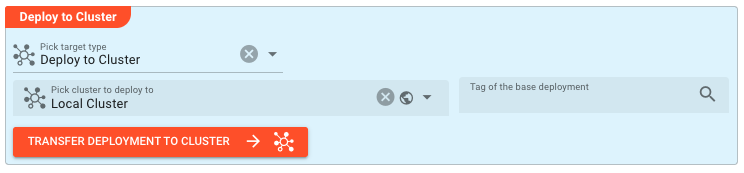
Select the Deployment Target where this Tag Settings configuration should be applied. This determines which cluster and environment will use these tag definitions.
Name & Description
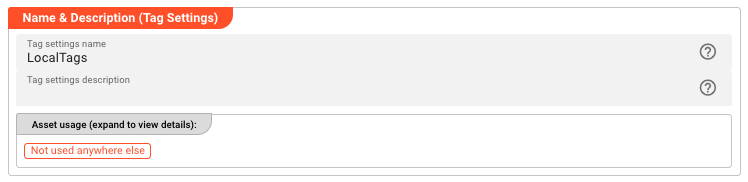
Tag settings name — Name of the Asset. Spaces are not allowed in the name.
Tag settings description — Enter a description to help identify the purpose of this tag configuration.
The Asset Usage box shows how many times this Asset is used and which parts are referencing it. Click to expand and then click to follow, if any.
Tags
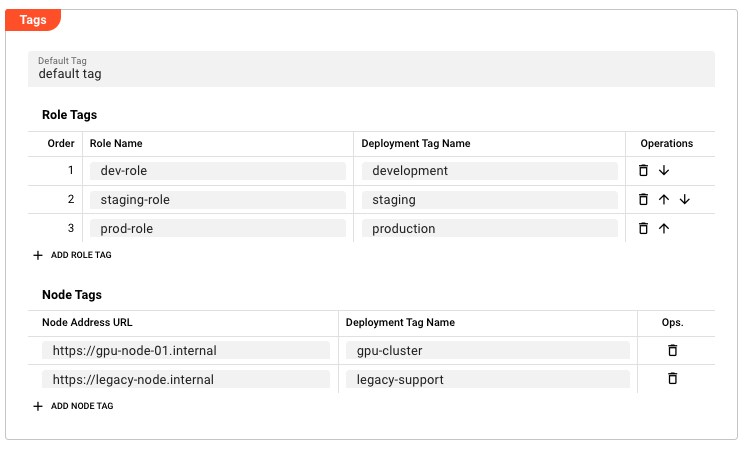
The Tags section contains three configuration areas for defining your tagging strategy.
Default Tag
Default Tag — The fallback tag value used when no specific node or role tag matches. This is an inheritable field, allowing you to override parent configurations.
Example values: production, development, batch-processing
Role Tags
Role Tags assign deployment tags based on the roles assigned to engines. Each mapping consists of:
| Column | Description |
|---|---|
| Order | The evaluation order (first match wins) |
| Role Name | The name of the engine role to match |
| Deployment Tag Name | The tag to assign when the role matches |
Key behaviors:
- Role tags are evaluated in the specified order
- The first matching role tag is applied
- If no role tag matches, the Default Tag is used
- Supports inheritance — child assets can override parent role tag definitions
Operations:
- Click Add Role Tag to create a new mapping
- Use the up/down arrows to change evaluation order
- Click the delete icon to remove a mapping
- Deleted mappings from inherited configurations can be restored using the reset icon
Node Tags
Node Tags assign deployment tags to specific nodes based on their address URL. This is useful for node-specific configurations.
| Column | Description |
|---|---|
| Node Address URL | The URL or address of the specific node |
| Deployment Tag Name | The tag to assign to this node |
Key behaviors:
- Node tags take precedence over role tags and default tags
- Most specific match wins — a node tag will override role and default tags
- Supports inheritance — child assets can override parent node tag definitions
- Useful for special-casing specific machines (e.g., high-memory nodes, GPU nodes)
Operations:
- Click Add Node Tag to create a new mapping
- Click the delete icon to remove a mapping
- Deleted mappings from inherited configurations can be restored using the reset icon
Behavior
Tag Resolution
When an engine starts or a deployment is evaluated, tags are resolved in the following priority order:
- Node Tag Check — If the node's address matches a Node Tag entry, use that tag
- Role Tag Check — If no node tag matched, evaluate Role Tags in order. Use the first matching role's tag
- Default Tag — If no node or role tags matched, use the Default Tag
This hierarchy allows for flexible, layered tagging strategies where specific nodes can be overridden, followed by role-based assignment, with a safe default fallback.
Inheritance
Tag Settings Assets support the standard layline.io inheritance model:
- Child assets inherit all tag definitions from their parent
- Individual fields can be overridden at the child level
- Deleted entries can be restored to parent values
- The inheritance chain is evaluated at deployment time
Use with Deployments
Tag Settings Assets are typically referenced in Engine Configuration assets. The tags defined here determine:
- Which filters apply to the engine in Operations views
- How deployments are organized in the management interface
- Visibility and grouping in monitoring and logging
Example
A common use case is organizing engines by environment and purpose:
Scenario: You have a cluster with development, staging, and production environments, plus some specialized batch processing nodes.
Configuration:
Default Tag: production
Role Tags:
| Order | Role Name | Deployment Tag Name |
|---|---|---|
| 1 | dev-role | development |
| 2 | staging-role | staging |
| 3 | batch-role | batch-processing |
Node Tags:
| Node Address URL | Deployment Tag Name |
|---|---|
https://gpu-node-01.internal | gpu-cluster |
https://legacy-node.internal | legacy-support |
Result:
- Most engines get the
productiontag (default) - Engines with
dev-roleget thedevelopmenttag - Engines with
staging-roleget thestagingtag - Engines with
batch-roleget thebatch-processingtag - The specific node
gpu-node-01.internalalways getsgpu-cluster, regardless of its role - The specific node
legacy-node.internalalways getslegacy-support
In the Operations view, you can now filter deployments by these tags to quickly find relevant engines.
See Also
- Engine Configuration — Define which workflows and assets are deployed to specific engines
- ReactiveCluster — Cluster configuration for coordinating multiple engine instances
- Deployment Composition — Groups all deployment configuration into a single deployable unit
Please note, that the creation of the online documentation is Work-In-Progress. It is constantly being updated. should you have questions or suggestions, please don't hesitate to contact us at support [at] layline.io .