Input Frame Committer
Purpose
The Input Frame Committer (Processor type: commitFrame) finalizes the processing of messages that originate from message queue sources such as Amazon SQS or Apache Kafka.
When a message is consumed from a queue, it remains locked (hidden) until explicitly committed — signaling that processing succeeded and the message can be removed or its offset advanced. The Input Frame Committer handles this final commit signaling automatically after a Workflow has finished processing a message.
This processor is typically placed at the end of a Workflow or after processing stages, immediately before the message leaves the Workflow. It is the last processor in the chain that touches the message.
Use this Processor to:
- Automatically delete messages from SQS queues after successful processing
- Advance Kafka consumer offsets after successful processing
- Control whether individual messages or entire streams are committed together
- Retry failed commits with configurable parallelism and backoff
Prerequisites
This Processor consumes messages from message queue sources (SQS, Kafka, etc.) that attach an InputFrame to each message. The InputFrame carries the metadata needed to commit — for SQS, this is the receipt handle; for Kafka, it is the partition and offset.
The Processor does not work with messages that lack an InputFrame (e.g., messages from file-based sources).
Configuration
Name & Description
Name: Name of the Asset. Spaces are not allowed in the name.
Description: Enter a description.
Input Ports

This Processor can only have one Input Port from which it receives data to process.
A port can have a name and description. A Name is mandatory.
You cannot delete the only Input Port.
Output Ports
This Processor can only have one Output Port to send messages on within the Workflow.

A port can have a name and description. A Port Name is mandatory.
You cannot delete the only Output Port.
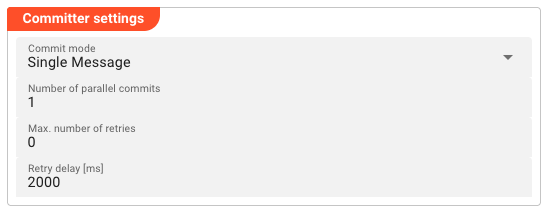
Committer Settings
Commit mode
Controls when the InputFrame.commit() is called for a message.
| Option | Behavior |
|---|---|
| Single Message | After the message is processed, the processor calls message.commit() immediately. On success the message is emitted downstream. On failure, the commit is retried with backoff. |
| Entire Stream | Messages are emitted immediately (passthrough). The processor defers calling message.commit() until a Commit event fires — signaling the entire stream has finished processing. All messages in the stream are then committed together. If any commit fails, retries apply to the entire stream. |

Number of parallel commits
The maximum number of concurrent commit operations the processor will have open at any time (1–64). Increase this to improve throughput on high-volume queues, but note that it also increases memory usage. Default: 1.
Max. number of retries
The maximum number of retry attempts before a failed commit is treated as permanent and triggers the configured failure handling. Default: 0 (no retries).
Retry delay [ms]
The time in milliseconds the processor waits before retrying a failed commit. Default: 2000 (2 seconds).
Failure Handling
Processing within a Flow Processor like this one can fail for various reasons. In this section you can define how the system should behave in case of such problems.
Failure Types
Four types of failures are observable:
| # | Failure observables / Reaction | Ignore | Retry Event/Message | Retry Stream | Rollback Stream |
|---|---|---|---|---|---|
| 1 | Stream start failure handlingA problem occurred in this Asset when starting a new stream. | ✔ | ✔ | ✔ | ✔ |
| 2 | Stream end failure handlingA problem occurred in this Asset when ending a stream. | ✔ | ✔ | ✔ | ✔ |
| 3 | Message failure handlingA problem occurred when handling a specific message in this Asset. | ✔ | ✔ | ✔ | ✔ |
| 4 | Rollback commit failure handlingA problem occurred during system issued rollback or commit procedure. | ✔ | ✔ | ✔ | ✔ |
Failure Type Reactions
Each of these failure types can be responded to with four different reactions:
Ignore
Don't do anything.
Rollback Stream
Rollback the complete stream. In the case of batch/file processing for example the complete file (which represents the stream) will be rolled back and put into error.
A rollback signal will be issued to all participating Workflow Processors. Each Processor needs to ensure itself how to deal with a rollback. A Javascript Flow Processor, for example, which directly interacts with a database will have to react to a rollback signal:
   export function onRollback() {
    if (connection) {
        try {
            connection.rollbackTransaction();
            connection.closeConnection();
        } catch (err) {
        } finally {
            connection = null;
        }
    }
}
Retry Stream
Don't simply give up. Try to process the whole stream again. This option allows you to define how often and in what intervals the retries should be performed.
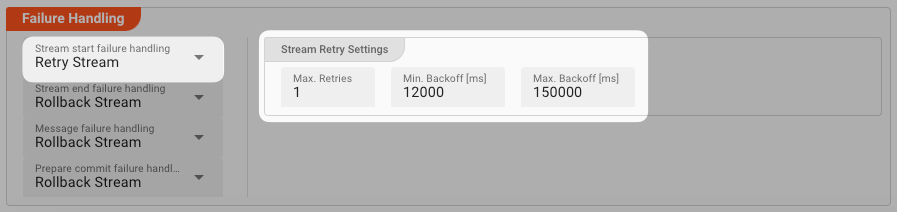
Stream Retry Settings
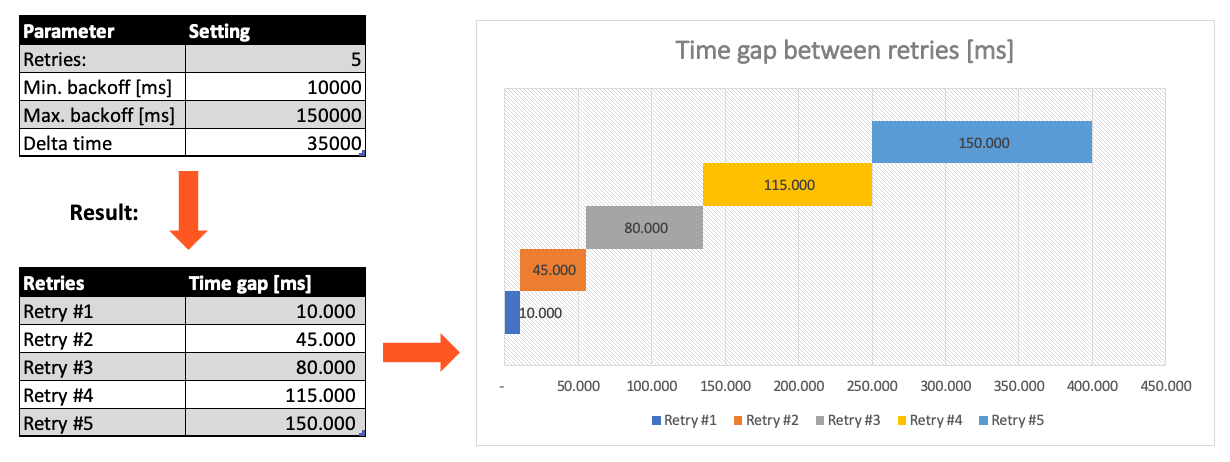
Max. Retries: The number of retries which should be performed. For example "5".Min. Backoff [ms]: Wait at least x milliseconds between each retry. For example "12000" (12 seconds).Max. Backoff [ms]: Wait at max x milliseconds between each retry. For example "150000" (150 seconds).
Based on these parameters, the system will try to balance the defined number of retries within the time boundaries of min. backoff and max. backoff. Taken the example numbers from above, the five retries would happen in this timespan:
Retry Event/Message
Pick this reaction if you want to retry processing the current message. As is the case with the Retry Stream reaction you can define how often and in what intervals the retries should be performed.
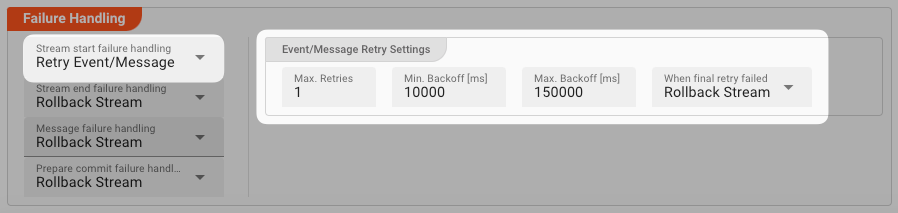
The settings are the same as with the Retry Stream reaction. So please refer to this.
There is one additional setting, however, which is When final retry failed.
You here have the option to decide what to do if the message cannot be processed, even after the final retry:
-
Ignore: Don't do anything. -
Rollback Stream: Fallback to rolling back the whole stream. -
Retry Stream: Retry the whole stream once again. If you pick this option, then you can again define all relevant Retry Stream parameters.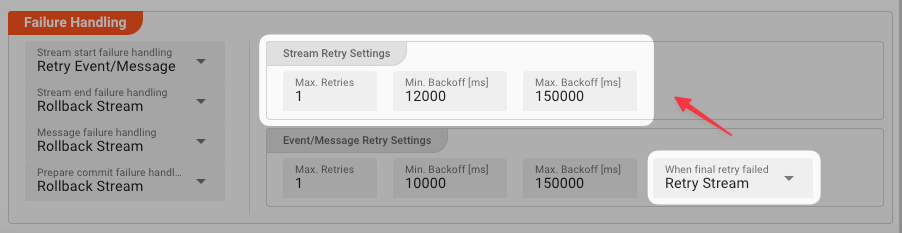
A Workflow has one Input Processor which is responsible for reading data from a Source. Sources are for example files, databases, or message queues.
The settings for Retry Event/Message and Retry Stream only work for specific Source Types which a Workflow uses.
These are:
Behavior
How Commit Works
The message.commit() call is made automatically by the processor — no script or manual action is required. What happens under the hood depends on the source type:
- SQS:
message.commit()callsSQS.DeleteMessageusing the message's receipt handle, permanently removing the message from the queue - Kafka:
message.commit()advances the consumer offset for the message's partition, allowing the consumer group to progress
Single Message Mode
The processor processes one message at a time per parallel lane. After the Workflow stage that receives the message finishes processing it, the processor calls message.commit(). On a successful commit response the message is emitted downstream. On a failure, the processor retries up to Max. number of retries times with Retry delay milliseconds between attempts. After all retries are exhausted, the configured failure handling takes over.
Entire Stream Mode
When the stream starts, the processor begins emitting messages immediately without committing. The InputFrame for each message is held in an internal queue. When a Commit event fires (signaling the stream has fully completed), the processor attempts to commit all queued InputFrames together. If any commit fails, the retry and failure handling applies to the entire batch.
Use Entire Stream mode when you want atomic processing — either the entire stream is committed, or none of it is. This is useful for batch/file processing where an incomplete result should not be partially committed.
Commit Failure and Retry
If message.commit() throws an exception (e.g., SQS delete fails, Kafka broker is unreachable), the processor:
- Increments the retry counter
- Waits for
Retry delay [ms] - Retries the commit up to
Max. number of retriestimes - If all retries fail, triggers the configured failure handling (ignore, retry event/message, rollback stream, etc.)
Inheritance
All Committer Settings fields are inheritable — a child Asset can override individual values while inheriting the rest from its parent.
Example
A Workflow reads messages from an Amazon SQS queue, processes each message with a JavaScript Processor, and then needs to delete the message from the queue after successful processing.
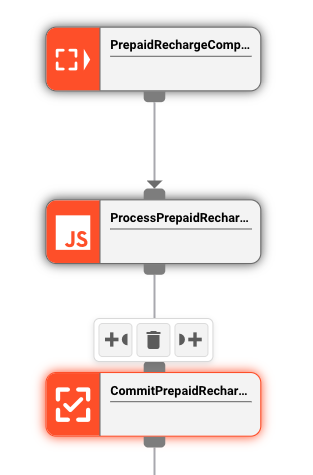
Workflow chain:
SQS Source → JavaScript Processor → Input Frame Committer
Configuration:
| Setting | Value |
|---|---|
| Commit mode | Single Message |
| Number of parallel commits | 1 |
| Max. number of retries | 3 |
| Retry delay [ms] | 2000 |
What happens:
- SQS Source delivers a message to the JavaScript Processor
- JS Processor processes the message (e.g., transforms data, writes to a database)
- Input Frame Committer receives the processed message, calls
message.commit() - SQS deletes the message from the queue
- On success, the message is emitted downstream (end of Workflow)
- On failure (e.g., SQS delete fails), the processor retries 3 times with 2-second delays before triggering failure handling
If the same pattern used Entire Stream mode instead, the processor would emit all messages immediately but defer the SQS delete calls until the stream's Commit event fires — then delete all messages in one batch.
See Also
- SQS Source — message source that attaches
InputFrameto SQS messages - Kafka Source — message source that attaches
InputFrameto Kafka records - Input Frame Processor — counterpart that attaches
InputFrameto messages; Input Frame Committer finalizes messages that carry it
Please note, that the creation of the online documentation is Work-In-Progress. It is constantly being updated. should you have questions or suggestions, please don't hesitate to contact us at support [at] layline.io .