Data Dictionary Updates
Purpose
The Data Dictionary is the global type system that layline.io maintains internally — a superset of all format definitions in a Project.
You can extend this global dictionary in two ways:
- Data Dictionary Format — a full Format Asset with encoding/decoding support for reading and writing data in a specific format
- Data Dictionary Updates Resource — a lightweight alternative for types that are used only internally or as a matter of convenience
The Resource exists for situations where you need a small data structure — for example a shared enum, a simple sequence used for internal bookkeeping, or a reusable type across Workflows — but where defining a complete Format Asset with input/output handling would be excessive.
For full details of supported element types (Namespace, Sequence, Choice, Enumeration, Array, Map), see the Data Dictionary Format documentation.
Configuration
Name & Description
Name: Name of the Asset. Spaces are not allowed in the name.
Description: Enter a description.
Data Dictionary
The Data Dictionary allows you to define complex data structures which can be mapped onto external data types and vice versa. This is necessary whenever an asset needs to exchange structured data with an external system — for example, when reading from or writing to a database, an HTTP API, a message queue, or any other format that carries typed fields.
Rather than hard-coding external field names and types into your Workflow, you define your own internal data types here. These internal types are then mapped to the external system's fields at the asset level. This means your Workflow scripts work with consistent, self-documenting data structures regardless of which external system the data came from.
When you need it
Whenever you configure an asset that exchanges structured data — a JDBC Service, a DynamoDB Service, an HTTP endpoint, an MQ message, a database Resource — you use the Data Dictionary to declare the types that represent:
- Request parameters — the data your Workflow sends to the external system
- Result data — the data the external system returns to your Workflow
- Intermediate structures — types that hold data during a transformation
Entity Types
The Data Dictionary is organized as a tree of typed entities. The available entity types are:
| Entity | Description |
|---|---|
| Namespace | Groups related types. Optional. If you reuse a namespace name that already exists in the Project, the two namespaces merge. |
| Sequence | An ordered list of typed members. Members are accessed by name, e.g. MyNamespace.Customer.Name. |
| Enumeration | A fixed set of named integer constants. |
| Choice | A type that holds exactly one of several possible member types. |
| Array | A sequence of elements of a single contained type. |
Defining Types — Step by Step
The following walkthrough shows how to build a data structure using the Data Dictionary editor. The example assumes a SQL customer table with columns id, name, and address — but the same pattern applies whenever you need to declare types for any asset.
1. Declare a new type
Click Declare Root Type in the toolbar to add a top-level entity.

2. Declare a namespace (optional)
Namespaces organize related types. To add one, right-click an existing node and select Add Sibling, then set the element type to Namespace.
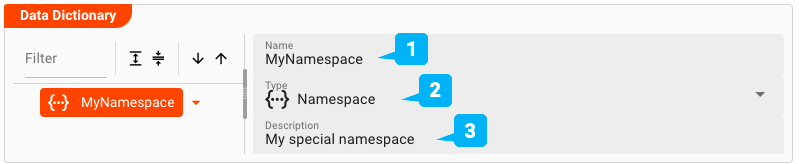
-
Name— The name of the namespace. If a namespace with this name already exists elsewhere in the Project, their contents merge automatically. Otherwise the name must be unique and may not contain spaces. -
Type— Pick the entity type. For a namespace, selectNamespace. -
Description— Optional free-text description.
3. Declare a Sequence under the namespace
Right-click the namespace and choose Add Child to add a child element.
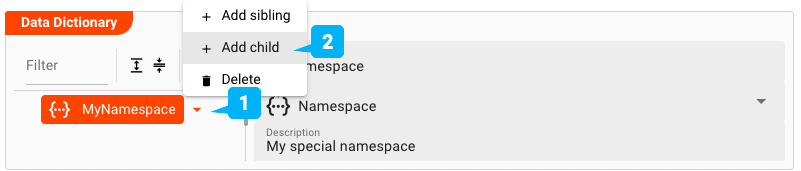
Click the arrow next to the namespace name and select Add child. Then fill in the element details:
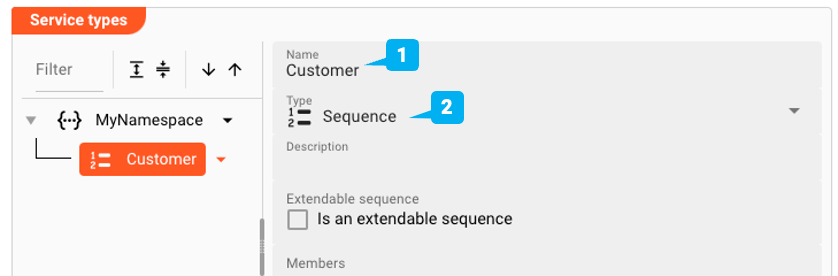
-
Name— The name of the element, e.g.Customer. -
Type— SelectSequenceas the element type. You will add individual fields (members) in the next step. -
Extendable Sequence— When checked, layline.io can dynamically extend the sequence's member list if incoming data contains fields that are not explicitly defined. Leave unchecked if all fields are known in advance.
4. Add members to the Sequence
With the Sequence selected, click Add Child to add individual fields:
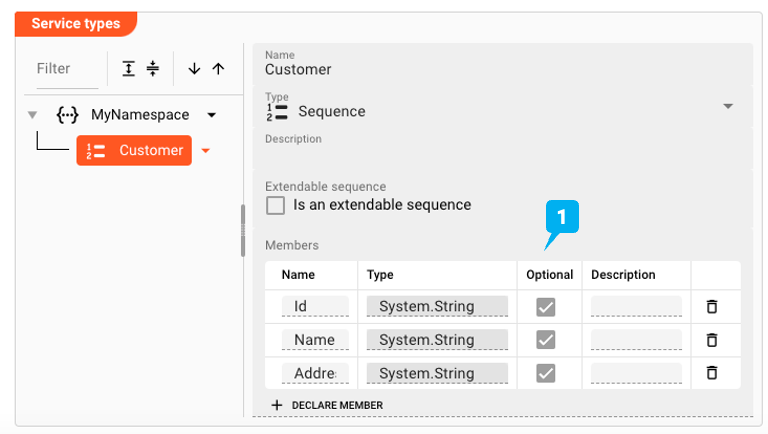
Each member maps to a column in the external data source. You can reference any member by its full path — for example, MyNamespace.Customer.Name — from your Workflow scripts.
Common Entity Fields
These fields are available on all entity types:
| Field | Description |
|---|---|
| Name | Unique identifier within the namespace. Reusing a namespace name from another part of the Project merges the two. |
| Type | The entity kind: Namespace, Sequence, Enumeration, Choice, or Array |
| Description | Optional free-text description |
| Extendable Sequence | (Sequence only) Allows the member list to be extended dynamically at runtime |
| Members | (Sequence) Ordered list of typed fields — click Add Child to add each one |
| Elements | (Enumeration) Named integer constants making up the enumeration |
Advanced Features
Inheritance and Override
Entities inherited from a parent format or resource appear in the tree in a distinct inherited style. These are read-only unless overridden. Click Reset to Parent on an overridden entity to restore the inherited definition.
Copy and Paste
Use the toolbar buttons to copy a complete entity subtree and paste it elsewhere in the tree. All members and nested entities travel with it.
Filter and Sort
Use the Filter field to search entities by name. The sort buttons order nodes ascending or descending alphabetically.
See Also
- Data Dictionary Format Asset — standalone Data Dictionary asset
- DynamoDB Service — Data Dictionary in context of a DynamoDB Service
- JDBC Service — worked example mapping Data Dictionary types to SQL columns
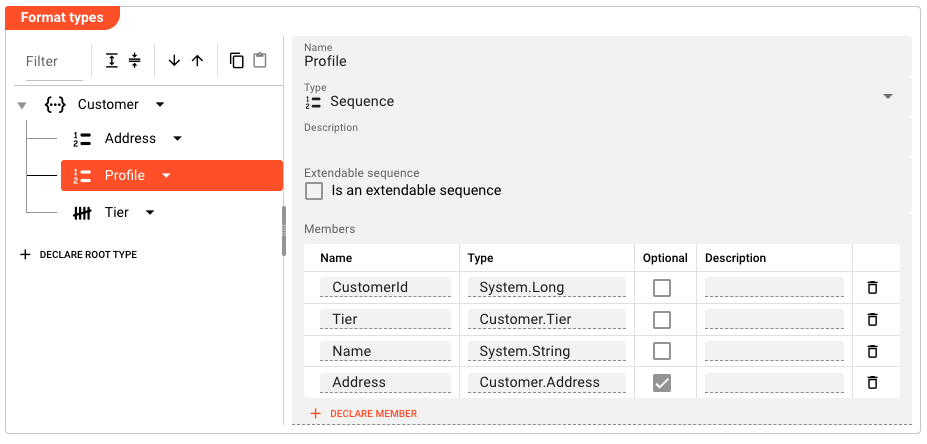
Example
The following defines a Customer namespace with shared types used across multiple Workflows:
Customer (Namespace)
├── Profile (Sequence)
│   ├── CustomerId  (System.Long)
│   ├── Tier        (Customer.Tier)
│   ├── Name        (System.String)
│   └── Address     (Customer.Address)  [optional]
├── Address (Sequence)
│   ├── Street  (System.String)
│   ├── City    (System.String)
│   ├── Zip     (System.Integer)
│   └── Country (System.String)
└── Tier (Enumeration)
    ├── Standard   (1)
    ├── Premium    (2)
    └── Enterprise  (3)
Once defined, any Asset in the Project can reference Customer.Profile.CustomerId, Customer.Tier.Standard, or Customer.Address.Country when mapping or transforming data.
Behavior
- Types declared in this Resource are merged into the global Data Dictionary at Project startup
- Types with identical names defined in multiple Format Assets or this Resource are merged; conflicting definitions produce a runtime error
- Inheritance is supported: a type can be overridden at a child Asset level and reset to the parent definition at any time
- The clipboard supports copy and paste of individual entity sub-trees within or across Data Dictionary Assets
See Also
- Data Dictionary Format — full reference for all element types, encoding configuration, and examples
- Data Dictionary Concept — architectural overview of how layline.io maintains and uses the global Data Dictionary
Please note, that the creation of the online documentation is Work-In-Progress. It is constantly being updated. should you have questions or suggestions, please don't hesitate to contact us at support [at] layline.io .