Directories
Purpose
The Directories Resource lets you define a set of named directory paths and symbolic links that are provisioned automatically when the Reactive Engine starts.
When the engine starts up, before any Workflow begins processing, this Resource is called. For each entry, it:
- Creates the directory if it does not already exist
- Applies the specified POSIX permissions if a permission string is provided and the filesystem supports it
- Creates any symbolic links that do not already exist
This means the Resource acts as a filesystem bootstrap — it ensures a known directory layout exists and is correctly permissioned before the engine begins processing, rather than requiring directories to be pre-created manually on every target host.
Use this Resource to:
- Ensure required directories exist on the engine host at startup
- Apply consistent POSIX permissions across environments without manual setup
- Create symbolic links that point to shared or network-mounted paths
Configuration
Name & Description
Name: Name of the Asset. Spaces are not allowed in the name.
Description: Enter a description.
Directories
A table of directory path / permission pairs:
Directory — the directory path. Can be relative (resolved against the Reactive Engine base directory) or absolute. Supports macros for environment-specific values.
Permissions — a Unix permission string (e.g. rw-r--r--). Optional. If omitted, the filesystem's default umask applies.
Symbolic Links
A table of symlink path / target pairs:
Symbolic link — the path where the symlink is created. Can be relative or absolute. Supports macros.
Target — the path the symlink points to. Must already exist at the time of symlink creation.
Behavior
- Both sections support inheritance: a child Asset can override individual entries while inheriting the rest from its parent
- Directory creation is idempotent — existing directories are not modified, only created if absent
- If a directory cannot be created (e.g. permission denied, parent path missing), engine startup fails with a
DIRECTORY_CREATION_FAILEDerror - If a symbolic link already exists and points to a different target, it is updated to point to the configured target
- Both paths and permissions support macro substitution, enabling per-environment configuration through inheritance
Example
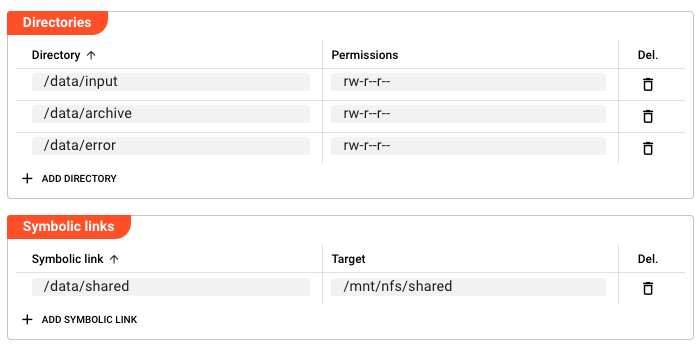
The following defines a layout for a file processing workflow:
Directories:
| Directory | Permissions |
|---|---|
/data/input | rw-r--r-- |
/data/archive | r--r--r-- |
/data/error | rw-r--r-- |
Symbolic Links:
| Symbolic link | Target |
|---|---|
/data/shared | /mnt/nfs/shared |
When the Reactive Engine starts, it creates input/, archive/, and error/ directories under /data/ if they do not exist, applies the specified permissions, and creates the /data/shared symlink pointing to /mnt/nfs/shared.
See Also
- Secret — for managing sensitive credentials alongside directory paths
- Environment — for environment-specific variable substitution
- Macros — for using macros in directory paths and permission strings
Please note, that the creation of the online documentation is Work-In-Progress. It is constantly being updated. should you have questions or suggestions, please don't hesitate to contact us at support [at] layline.io .