OAuthClient
Purpose
The OAuthClient Resource stores OAuth 2.0 client credentials (authority, client ID, token endpoint, and client secrets) and registers them with the engine's internal Security Storage when the Reactive Engine starts.
This Resource is used by the layline.io platform itself — specifically the REST API's security management endpoints — to manage OAuth client credentials for integrations that require OAuth authentication. It is not referenced directly by Connections or Targets in a Project.
In practice, if layline.io needs to authenticate with an external OAuth provider (e.g. Microsoft Graph, Google Cloud APIs) on behalf of a user, it stores and retrieves the OAuth client credentials via Security Storage using this Resource. Users manage these credentials through the layline.io management interface.
Use this Resource to:
- Store OAuth client credentials managed by the layline.io platform
- Provide client credentials that are retrieved via the Security Storage REST API
Configuration
Name & Description
Name: Name of the Asset. Spaces are not allowed in the name.
Description: Enter a description.
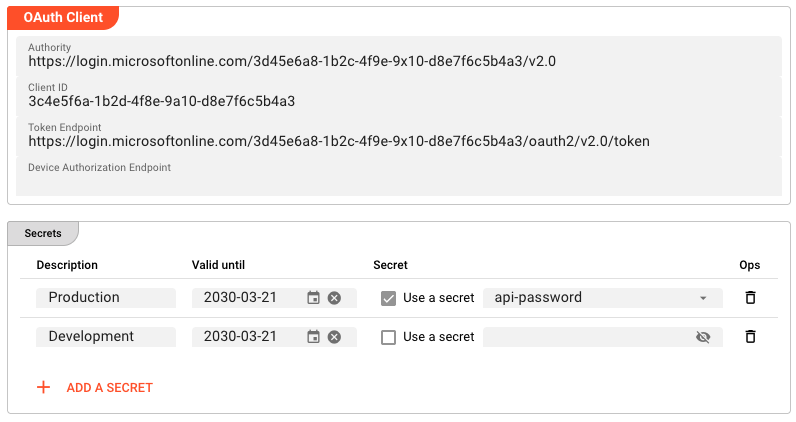
OAuth Client
Authority — the base URL of the OAuth authorization server. For example, for Microsoft Entra ID this would be https://login.microsoftonline.com/{tenant-id}/v2.0. Required.
Client ID — the OAuth client identifier assigned by the authorization server. Required.
Token Endpoint — the full URL of the token endpoint (e.g. https://login.microsoftonline.com/{tenant-id}/oauth2/v2.0/token). Required.
Device Authorization Endpoint — the full URL of the device authorization endpoint. Optional. Required only for Device Code flow authentication.
Secrets
The Secrets table stores one or more client secrets associated with this OAuth client. Each row has four columns:
Description — a human-readable label identifying the secret (e.g. Production).
Valid until — an optional expiry date. If set, the secret is considered invalid after this date.
Secret — the secret value. Enable Use a secret to reference a value from Secret Storage, or disable it to enter a raw secret value directly.
Ops — remove this secret entry.
Behavior
- All fields support inheritance: a child Asset can override individual values while inheriting the rest from its parent
- If
Valid untilis left empty, the secret does not expire - The Resource validates that
Authority,Client ID, andToken Endpointare non-blank at configuration export time; missing values produce build errors - At engine startup, credentials are registered with Security Storage via the REST API — they are available to the management interface but are not referenced by Project Assets
- Multiple secrets can coexist for the same OAuth client; the management interface selects the appropriate one based on its configuration
See Also
- Secret — for storing secret values in Secret Storage and referencing them in this Resource
- Secret Management (Concept) — overview of how layline.io manages credentials
Please note, that the creation of the online documentation is Work-In-Progress. It is constantly being updated. should you have questions or suggestions, please don't hesitate to contact us at support [at] layline.io .