Sink WebSocket
Purpose
Defines the outbound connection parameters for a WebSocket sink. The sink acts as a WebSocket client — it connects to a remote WebSocket server and sends data to it. Connection parameters are configured inline; no separate Connection asset is required.
This Asset can be used by:
| Asset type | Link |
|---|---|
| Output Processors | Stream Output Processor |
Prerequisite
No other assets are required to configure this sink. All connection parameters are set directly within this asset.
Configuration
Name & Description
-
Name: Name of the Asset. Spaces are not allowed in the name. -
Description: Enter a description.
Inheritance chain of this Asset — If this Asset extends another, the inheritance chain is shown here. Click to navigate to any parent Asset in the chain.
Asset Usage: If the Asset is used by other Assets, the Asset Usage box shows how many times this Asset is used and which parts are referencing it. Otherwise it is not shown. Click to expand and then click to follow, if any.
Required roles

In case you are deploying to a Cluster which is running (a) Reactive Engine Nodes which have (b) specific Roles
configured, then you can restrict use of this Asset to those Nodes with matching
roles.
If you want this restriction, then enter the names of the Required Roles here. Otherwise, leave empty to match all
Nodes (no restriction).
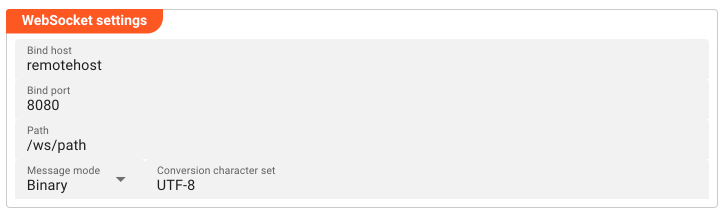
WebSocket Settings
- Bind host: Local network interface or IP address to bind when connecting to the remote WebSocket server. Leave empty to bind to all interfaces.
- Bind port: Local port to use when establishing the outbound connection.
- Path: Path on the remote WebSocket server (e.g.
/ws,/stream). - Message mode: How messages are encoded on the wire: Mixed (text and binary frames), Binary, or Text.
- Conversion character set: Character encoding used for text messages. Only applies when Message mode is
MixedorText. Disabled (grayed out) when set toBinary.
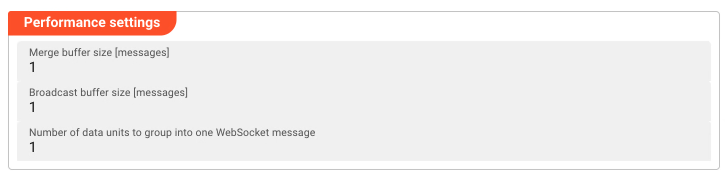
Performance Settings
- Merge buffer size [messages]: Number of messages to buffer before sending. Increase to improve throughput; decrease for lower latency.
- Broadcast buffer size [messages]: Number of messages to buffer for broadcast to connected clients.
- Number of data units to group into one WebSocket message: How many data units are aggregated into a single outgoing WebSocket frame.
Related Topics
Internal
Please note, that the creation of the online documentation is Work-In-Progress. It is constantly being updated. should you have questions or suggestions, please don't hesitate to contact us at support [at] layline.io .