Sink GCS
Purpose
Writes messages to a Google Cloud Storage (GCS) bucket as objects. Each incoming message produces one object in the configured bucket, under the configured prefix path. Authentication is handled via a linked Google Cloud Connection asset using OAuth 2.0.
Prerequisites
- A Google Cloud Connection asset configured with the appropriate OAuth scopes.
- A Google Cloud project with the Google Cloud Storage API enabled.
- A GCS bucket in that project.
Configuration
Name & Description
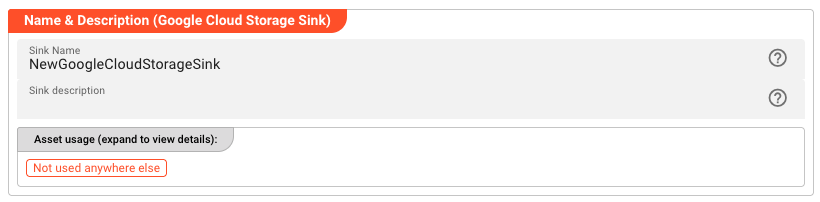
Name — Unique name for this asset within the project. Spaces are not allowed.
Description — Optional description of what this sink is used for.
The Asset Usage box shows how many times this Asset is used and which parts are referencing it.
Required Roles

In case you are deploying to a Cluster with Reactive Engine Nodes that have specific Roles configured, you can restrict use of this Asset to Nodes with matching roles. Leave empty to match all Nodes.
Google Cloud Storage Settings
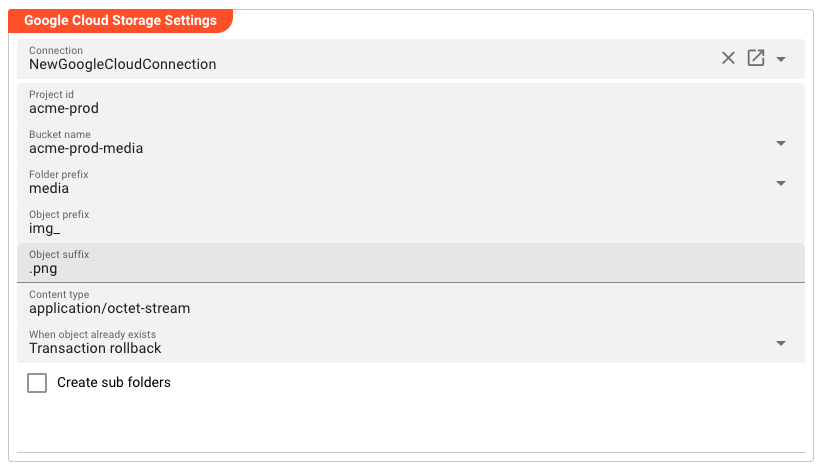
Connection — The linked Google Cloud Connection asset used for OAuth 2.0 authentication. Required. The remaining fields cannot be configured until a connection is selected.
Project ID — The Google Cloud project ID that owns the target bucket.
Bucket Name — The name of the GCS bucket to write to.
Folder Prefix — A path prefix within the bucket under which objects will be written (e.g., logs/ or data/output/). GCS has a flat namespace — these are key prefixes, not real folders. See GCS-Specific Notes.
Object Prefix — An additional prefix prepended to the object name. Useful to distinguish between multiple streams going to the same bucket/prefix combination.
Object Suffix — A suffix appended to the object name. Useful for setting file extensions such as .json or .xml.
Content Type — The MIME type to set on written objects. Defaults to application/octet-stream if not specified (e.g., application/json).
When Object Already Exists — What to do when an object with the same key already exists in the bucket.
| Option | Behavior |
|---|---|
| Transaction rollback | Fail the transaction and roll back. |
| Replace the existing object | Overwrite the existing object with new content. |
| Create a new object using a numerical version counter as suffix | Write <key>.1, <key>.2, etc. |
| Create a new object using the current timestamp as suffix | Write <key>.<epoch-timestamp>. |
Create Sub Folders — When enabled, layline.io creates intermediate /-delimited key prefixes as needed. Default: disabled.
GCS-Specific Notes
Flat Namespace
GCS does not have a real folder hierarchy. What appear as "folders" in the Google Cloud Console or gsutil are simply /-delimited prefixes in object keys. For example, the object logs/2026/03/app.log is a single object — there is no logs/ folder that must exist before logs/2026/03/app.log can be created.
The Folder Prefix and Create Sub Folders fields work with these key prefixes, not with a physical directory structure.
Authentication
GCS Sink uses OAuth 2.0 for authentication — there is no access key / secret key mechanism. The OAuth credentials are defined in the linked Google Cloud Connection asset.
Project ID vs. Region
Unlike AWS S3, which uses a region, GCS organizes resources by project. You must specify the Google Cloud project ID that owns the target bucket. This project must be the same project that the OAuth client in the Google Cloud Connection was created in.
Behavior
Each incoming message to this sink produces one object in GCS. The object key is constructed as:
[<Folder Prefix>/][<Object Prefix>]<message-key>[<Object Suffix>]
For example, given:
| Field | Value |
|---|---|
| Bucket Name | my-gcs-bucket |
| Folder Prefix | output/ |
| Object Prefix | events- |
| Object Suffix | .json |
An incoming message with key order-1234 will be written to GCS as:
my-gcs-bucket/output/events-order-1234.json
Example
Given this configuration:
| Field | Value |
|---|---|
| Connection | my-gc-connection |
| Project ID | my-gcp-project |
| Bucket Name | my-gcs-bucket |
| Folder Prefix | output/ |
| Object Prefix | events- |
| Object Suffix | .json |
| Content Type | application/json |
| When Object Already Exists | Replace the existing object |
| Create Sub Folders | false |
An incoming message with key order-1234 will be written to GCS as:
my-gcs-bucket/output/events-order-1234.json
If an object with that key already exists, it is replaced.
See Also
- Google Cloud Connection — Authentication for GCS assets
- GCS Source — Read objects from Google Cloud Storage
Please note, that the creation of the online documentation is Work-In-Progress. It is constantly being updated. should you have questions or suggestions, please don't hesitate to contact us at support [at] layline.io .