AI Service
Purpose
The AI Service exposes one or more trained AI models as callable functions from JavaScript or Python scripts within a Workflow. Scripts access the service via the services pseudo-class — the same mechanism used for other services like JDBC or KVS. Each logical model name in the service maps to a dynamically generated function that can classify new data.
Prerequisites
- One or more AI Model Resources defining the model type, input/output schema, and hyperparameters
- One or more trained models stored in AI Storage (trained by an AI Trainer)
- A Data Dictionary with attributes defined in the namespace configured in the service
If you are not familiar with the AI workflow in layline.io, read Using Artificial Intelligence in Workflows first.
Configuration
Name & Description
Name — Name of the Asset. Spaces are not allowed.
Description — Free-text description of this service.
Required roles
If you are deploying to a Cluster with Reactive Engine Nodes that have specific Roles configured, you can restrict use of this Asset to those Nodes with matching roles. Leave empty to match all Nodes (no restriction).
AI Service Settings
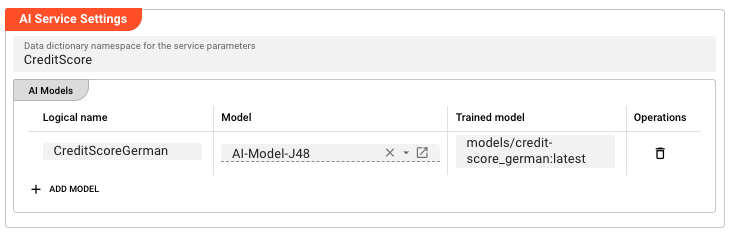
Data dictionary namespace for the service parameters — The Data Dictionary namespace used to define the request and response parameters for this service. Supports macros for per-environment values.
AI Models
The AI Models table lists the models this service exposes. Each row maps a logical parameter name to an AI Model Resource and a trained model version in AI Storage.
Click + Add model to add a row:
| Column | Description |
|---|---|
| Logical name | The logical name for this model. This name is used as part of the function name in scripts. |
| Model | Reference to an AI Model Resource in the Project. Select from the filtered list of AI Model Resources. |
| Trained model | The path in AI Storage where the trained model is stored (e.g., models/usage-classifier). Append :<version> for a specific version (e.g., models/usage-classifier:3) or :latest for the most recent version. |
Behavior
Exposed functions
For each row in the AI Models table, the service dynamically generates one or more functions:
If a trained model path is set:
| Function name | Description |
|---|---|
<LogicalName>Classify | Classify a single record using the trained model |
If an AI Model Resource is set (without a trained model path):
| Function name | Description |
|---|---|
<LogicalName>BeginTraining | Begin a new training session |
<LogicalName>Learn | Add training data to the session |
<LogicalName>FinishTraining | Complete training and store the model in AI Storage |
Invocation from scripts
The AI Service is accessed from JavaScript or Python scripts the same way as other services (JDBC, KVS, etc.) — via the services pseudo-class.
1. Link the service to a script processor:
In the JavaScript or Python Processor editor, add the AI Service to the processor's Service Assignments.
2. Access the service in your script:
- JavaScript
- Python
// Access the AI Service via the services pseudo-class
const aiService = services.MyServiceName;

// Call the Classify function for a trained model
const result = await aiService.CreditScoreGermanClassify({
    // Input attributes matching the AI Model Resource's input schema
    call_type_ind: "VOICE",
    rate_scenario_cd: "STANDARD",
    primary_mcc_mnc: "26201"
});

// The result contains the predicted class label
processor.logInfo("Classification result: " + result.classLabel);
# Access the AI Service via the services pseudo-class
ai_service = services.MyServiceName

# Call the Classify function for a trained model
result = ai_service.CreditScoreGermanClassify({
    # Input attributes matching the AI Model Resource's input schema
    "call_type_ind": "VOICE",
    "rate_scenario_cd": "STANDARD",
    "primary_mcc_mnc": "26201"
})

# The result contains the predicted class label
processor.log_info("Classification result: " + result.classLabel)
Model versioning
Each training run of the same model path creates a new version in AI Storage. Use :latest to always use the most recent version, or specify :<version-number> to pin to a known version.
Example
An AI Service exposes a trained credit scoring model for use by a script processor.
Step 1 — Prerequisites:
- AI Model Resource:
AI-Model-J48(Weka J48, defines input attributes and class attribute) - Trained model in AI Storage:
models/credit-score_german:latest - Data Dictionary namespace:
CreditScore(defines the input/output attribute types)
Step 2 — Configure the AI Service:
| Setting | Value |
|---|---|
| Name | CreditScoringService |
| Data dictionary namespace | CreditScore |
| Logical name | CreditScoreGerman |
| Model | AI-Model-J48 |
| Trained model | models/credit-score_german:latest |
This exposes the function CreditScoreGermanClassify(...) in scripts.
Step 3 — Link the service to a script processor:
In a JavaScript or Python Processor, add CreditScoringService to its Service Assignments.
Step 4 — Classify records:
- JavaScript
- Python
export function onMessage(message) {
    // Call the AI Classification function
    const result = await services.CreditScoringService.CreditScoreGermanClassify({
        call_type_ind: message.callType,
        rate_scenario_cd: message.rateScenario,
        primary_mcc_mnc: message.mccMnc
    });

    // Use the classification result
    message.classification = result.classLabel;

    stream.emit(message, OUTPUT_PORT);
}
OUTPUT_PORT = processor.get_output_port('Output')

def on_message(message):
    # Call the AI Classification function
    result = services.CreditScoringService.CreditScoreGermanClassify({
        "call_type_ind": message.callType,
        "rate_scenario_cd": message.rateScenario,
        "primary_mcc_mnc": message.mccMnc
    })

    # Use the classification result
    message.classification = result.classLabel

    stream.emit(message, OUTPUT_PORT)
Incremental training via BeginTraining / Learn / FinishTraining
If no trained model path is set in the AI Models table (only an AI Model Resource is configured), the service exposes three additional functions for online/incremental training. This is useful when training data arrives over time and you want to update the model without a full batch training run.
Step 1 — Configure for training:
| Setting | Value |
|---|---|
| Name | CreditScoringService |
| Data dictionary namespace | CreditScore |
| Logical name | CreditScoreGerman |
| Model | AI-Model-J48 |
| Trained model | (leave empty — this enables the training functions) |
This exposes the functions CreditScoreGermanBeginTraining(...), CreditScoreGermanLearn(...), and CreditScoreGermanFinishTraining(...).
Step 2 — Begin a training session:
- JavaScript
- Python
export function onMessage(message) {
    // Begin a new training session
    const handle = await services.CreditScoringService.CreditScoreGermanBeginTraining({});
    processor.logInfo("Training session started, handle: " + handle);
}
def on_message(message):
    # Begin a new training session
    handle = services.CreditScoringService.CreditScoreGermanBeginTraining({})
    processor.log_info("Training session started, handle: " + handle)
Step 3 — Add training data:
- JavaScript
- Python
export function onMessage(message) {
    // Add a training record to the session
    await services.CreditScoringService.CreditScoreGermanLearn({
        Handle: sessionHandle,  // the handle returned by BeginTraining
        Attribute: {
            call_type_ind: message.callType,
            rate_scenario_cd: message.rateScenario,
            primary_mcc_mnc: message.mccMnc,
            classLabel: message.actualClass  // the known correct label
        }
    });
    processor.logInfo("Training data added");
}
def on_message(message):
    # Add a training record to the session
    services.CreditScoringService.CreditScoreGermanLearn({
        "Handle": sessionHandle,  # the handle returned by BeginTraining
        "Attribute": {
            "call_type_ind": message.callType,
            "rate_scenario_cd": message.rateScenario,
            "primary_mcc_mnc": message.mccMnc,
            "classLabel": message.actualClass  # the known correct label
        }
    })
    processor.log_info("Training data added")
Step 4 — Finish training:
- JavaScript
- Python
export function onStreamEnd() {
    // Complete training and store the model in AI Storage
    await services.CreditScoringService.CreditScoreGermanFinishTraining({
        Handle: sessionHandle  // the handle returned by BeginTraining
    });
    processor.logInfo("Model training complete, stored in AI Storage");
}
def on_stream_end():
    # Complete training and store the model in AI Storage
    services.CreditScoringService.CreditScoreGermanFinishTraining({
        "Handle": sessionHandle  # the handle returned by BeginTraining
    })
    processor.log_info("Model training complete, stored in AI Storage")
See Also
- AI Trainer — train and store models in AI Storage
- AI Classifier — use a trained model directly within a Workflow stream
- AI Model Resource — define the model specification used for training and by this service
- Using Artificial Intelligence in Workflows — conceptual overview of supervised learning in layline.io
Please note, that the creation of the online documentation is Work-In-Progress. It is constantly being updated. should you have questions or suggestions, please don't hesitate to contact us at support [at] layline.io .