Proxy Service
Purpose
The Proxy Service acts as a forwarding proxy for service function calls to another Reactive Engine cluster. It allows a Javascript Processor deployed on cluster A to call service functions that are running on a completely different cluster B — without changing a single line of JavaScript code.
This is useful when:
- A service you need to call is deployed on a different cluster (e.g. a shared central cluster, or a cluster in a different data centre)
- You want to switch which cluster handles a service call by changing only the Proxy Service configuration — not the JavaScript
- You need to access a service function from multiple environments (dev, staging, prod) where the URL and credentials differ, but the JavaScript stays identical
The Proxy Service does not define its own functions. When you invoke services.MyProxy.FunctionName(...) in a Javascript Processor, the Proxy Service intercepts the call and tunnels it to the configured remote cluster. The available functions are discovered dynamically from that remote cluster via the cluster's discovery mechanism. You must know the function names and their signatures — these are the same functions defined by the target service on the remote cluster.
How It Works
When you map a Proxy Service in a Javascript Asset and invoke services.MyProxy.GetCustomer(...), the call is forwarded to the remote cluster at the URL configured in the Proxy Service. The function name and parameters are passed through unchanged. There is no difference in the JavaScript call syntax between invoking a local service and a proxied one.
To proxy multiple different services, create a separate Proxy Service Asset for each one.
Configuration
Name & Description
-
Service Name: Name of the Asset. This is the name you will use in JavaScript to reference this proxy (e.g.services.MyProxy). Spaces are not allowed in the name. -
Service Description: Enter a description.
The Asset Usage box shows how many times this Asset is used and which parts are referencing it.
Click to expand and then click to follow, if any.
Required Roles
In case you are deploying to a Cluster which is running (a) Reactive Engine Nodes which have (b) specific Roles configured, then you can restrict use of this Asset to those Nodes with matching roles.
If you want this restriction, then enter the names of the Required Roles here. Otherwise, leave empty to match all Nodes (no restriction).
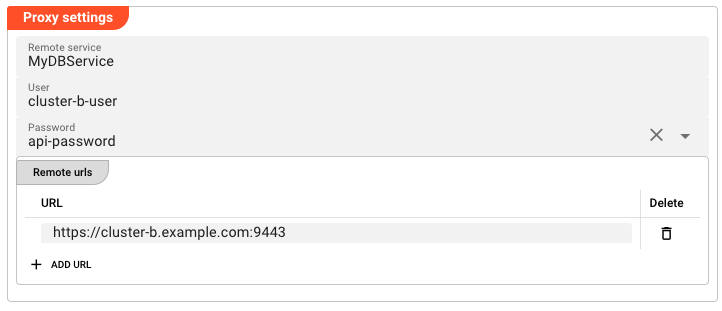
Proxy Settings
-
Remote service: The exact name of the target service on the remote cluster. The Proxy Service will forward calls to this service name on the target cluster. This name must exactly match the service name on the remote cluster — including case. If you need to proxy multiple distinct services, create a separate Proxy Service Asset for each one. -
User: Username to authenticate against the remote cluster. -
Password: Password to authenticate against the remote cluster. This field does not accept a plain-text password. It is a dropdown that lists all secrets defined in your project's Secret assets. Select the named secret you want to use (e.g.proxy-password). The secret value is resolved at runtime — it is never stored in clear text in the project configuration.To create or manage secrets, see the Secret Asset documentation.
-
Remote urls: List of remote URLs to proxy to. Each URL is entered on a separate line. When multiple URLs are provided, requests are routed to one of them (behaviour depends on the target service configuration).To add a URL, click Add URL and enter the URL in the text field. To remove a URL, click the remove button next to it.
Example — Cross-Cluster Service Invocation
Setup
Imagine you have:
- Cluster A (your local cluster) where your Javascript Processor runs
- Cluster B where a service
MyDBServiceis deployed with a functionGetCustomer
On Cluster B, the MyDBService has this function:
| Function | Parameters |
|---|---|
GetCustomer | { customerId: string } |
Step 1 — Create a Secret for Authentication
Create a Secret Asset in your project (e.g. ClusterB_Credentials). Add a key-value pair:
| Key | Value |
|---|---|
proxy-password | S3cr3tP@ssw0rd! |
Make sure the Secret is encrypted with the appropriate key for Cluster B.
Step 2 — Create the Proxy Service
Create a new Proxy Service Asset named MyProxy. Configure:
- Remote service:
MyDBService— must match the service name on Cluster B exactly - User:
cluster-b-user - Password: Select
proxy-passwordfrom the Secret dropdown - Remote urls:
https://cluster-b.example.com:9443
Step 3 — Map the Proxy Service in a Javascript Asset
In your Javascript Processor asset, add a Service Mapping:
- Service: Select
MyProxy - Logical Service Name:
MyProxy(or any name you will use in your script)
Step 4 — Invoke from JavaScript
In your script, invoke the proxied function exactly as you would a local one:
export function onMessage() {
    const result = services.MyProxy.GetCustomer({
        customerId: m.data.customerId
    });

    if (result && result.data && result.data.length > 0) {
        const customer = result.data[0];
        processor.logInfo('Customer: ' + customer.name);
        // Continue processing...
    }
}
Note: The call syntax is identical to calling a local service. The Proxy Service handles the cross-cluster tunnelling transparently.
See Also
- Secret Asset — managing encrypted credentials
- Service Asset Introduction — how services work in general
- Javascript Processor — calling services from JavaScript